

A Single, Cost-Effective Solution for High-Quality Live and On-Demand Video
Vbrick Edge Caching brings video closer to your viewers by storing it on servers you already own, at the edge of your enterprise WAN. The first person at a site pulls the stream; everyone after them watches from the local cache.
It is a software-only enterprise content delivery network (eCDN) with a one-time setup, and it works the same way for live broadcasts and on-demand playback.
Why Enterprises Use Edge Caching for Video
Our caching software, placed strategically on servers at the edge of the enterprise WAN, retrieves and stores video fragments locally. Subsequent viewers in the same location access the video directly from the local cache, reducing traffic on the corporate internet connection and WAN links. This preserves bandwidth for critical applications, providing employees with a high-quality, glitch-free experience with faster start times.

- Software-only. Installs on servers you already run — no appliances to buy, rack or maintain.

Scales with one setup. Add locations without redesigning the deployment.

- Cheaper than more bandwidth. An alternative to upgrading WAN links to absorb peak video load.

- Centrally managed.One cloud console for every cache, with cache routing rules controlling which sites serve which content.
What Is Edge Caching?
For websites, that usually means caching images, stylesheets, and scripts across a public content delivery network. For enterprise video, the problem is different in kind, not just in scale.
Edge Caching for Enterprise Video vs. Website Caching
A public CDN caches at the edge of the internet. That gets video as far as your building — and then stops. The bottleneck in a corporate all-hands is not the journey from the origin to your ISP; it is the last leg, where several thousand employees on one campus each open an independent stream across the same WAN link.
An enterprise content delivery network caches inside your network instead. Vbrick Edge Caching places caching software on servers at the edge of your enterprise WAN. The first viewer in a location pulls the video fragments; everyone after them streams from the local cache. One stream crosses the WAN instead of thousands, and bandwidth stays available for the applications your business runs on.
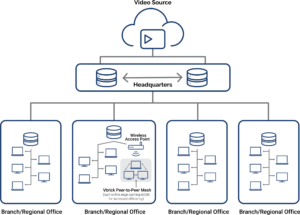
How Vbrick Edge Caching Works
- Deploy. Caching software is installed on existing servers at each location. No dedicated appliances and no infrastructure purchase — it is a software-only, one-time setup.
- Cache on first request. The first viewer at a site requests the stream. The edge cache retrieves the video fragments and stores them locally.
- Serve locally. Every subsequent viewer at that site is served from the local cache. Start times drop, buffering stops, and the corporate internet connection stays clear.
- Manage centrally. All caches are configured and monitored from one cloud console, with cache routing rules that determine which locations serve which content.
This works identically for live broadcasts and on-demand playback — the same cache serves a town hall in progress and the recording watched a week later.